APIs to manage an Organisation's monitor reports.
HoxtonAi API (0.0.1)
All endpoints need a valid access token which can be obtained following either of the authentication flows detailed below. Both the authentication methods required a OAuth2 client. Create a OAuth2 client for your organisation at https://app.hoxton.ai/settings?tab=oauth_client, if not done already.
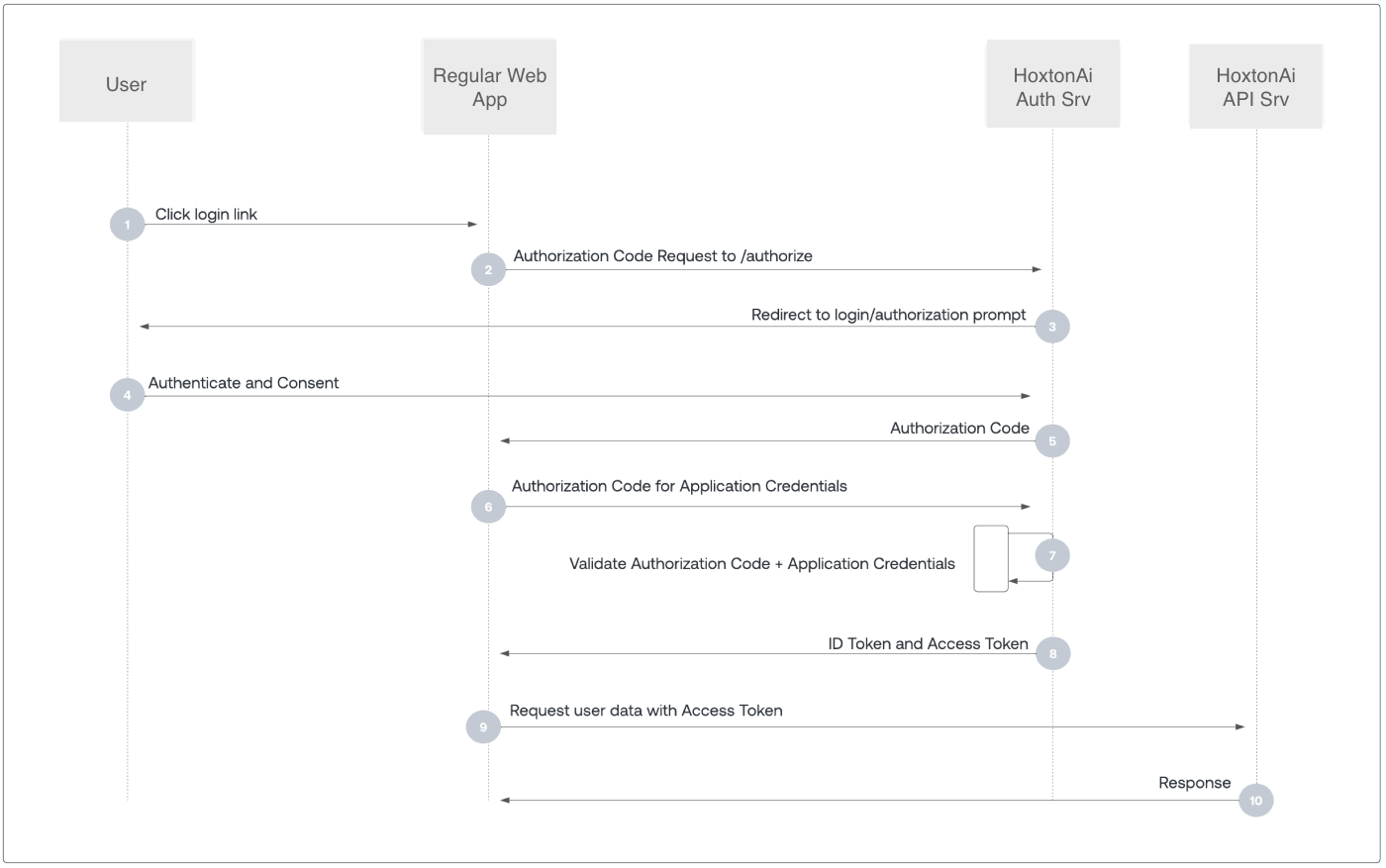
This method is preferred if you plan to share your oauth client credentials with a third part app. This method involves directing user to the login page on the authorization server. After the user has successfully authenticated, exchange authorization code received from the server to the access_token. This is a multistep method.
- Get
authorization_code:- Endpoint:
https://auth.hoxton.ai/authorize - Parameters:
- Endpoint:
| Parameter | Type | Description |
|---|---|---|
response_type | required | Always set this to code |
audience | required | Always set this to https://api.hoxton.cloud |
scope | optional | A space separated list of claims to include in the token. Use profile to get ID token. Include offline_access to get Refresh Token. |
client_id | required | The oauth client's id |
redirect_uri | required | URL the user should be redirect to after successful login. This must be a valid Allowed Callback URL set in the oauth client |
An example authorization url would be:
https://auth.hoxton.ai/authorize?
    response_type=code&
    client_id=<CLIENT_ID>&
    redirect_uri=<REDIRECT_URI>&
    scope=offline_access&
    audience=https://api.hoxton.cloud
On successful authentication, you will receive a HTTP 302 response with the authorization_code included as a parameter.
HTTP/1.1 302 Found
Location: <REDIRECT_URI>?code={authorization_code}- Exchange
authorization_codetoaccess_token:- Endpoint:
https://auth.hoxton.ai/oauth/token - Parameters:
- Endpoint:
| Parameter | Type | Description |
|---|---|---|
grant_type | required | Always set this to authorization_code |
code | required | The authorization_code from the previous step |
client_id | required | The oauth client's id |
client_secret | required | The oauth client's secret |
redirect_uri | required | A valid URL configured in the oauth client. This must match exactly the URL passed to the authorization endpoint in the first step |
You can now exchange the authorization_code from the above step to the access_token by making a POST request to the token URL.
curl -X POST https://auth.hoxton.ai/oauth/token
  -H 'Content-Type: application/json'
  -d '{
    "grant_type": "authorization_code",
    "code": "<code_from_authorization_step>",
    "client_id": "<CLIENT_ID>",
    "client_secret": "<CLIENT_SECRET>",
    "redirect_uri": "<REDIRECT_URI>"
  }'
All going well, you will get a HTTP 200 response with the access_token which is valid for 24hr.
{
  "access_token": "eyJhbGc...2oSuHNwA",
  "refresh_token": "v1.MT...4XFunfTks",
  "id_token": "eyv1.KDNM3w...vPkdKvMU",
  "token_type": "Bearer",
  "expires_in": 86400
}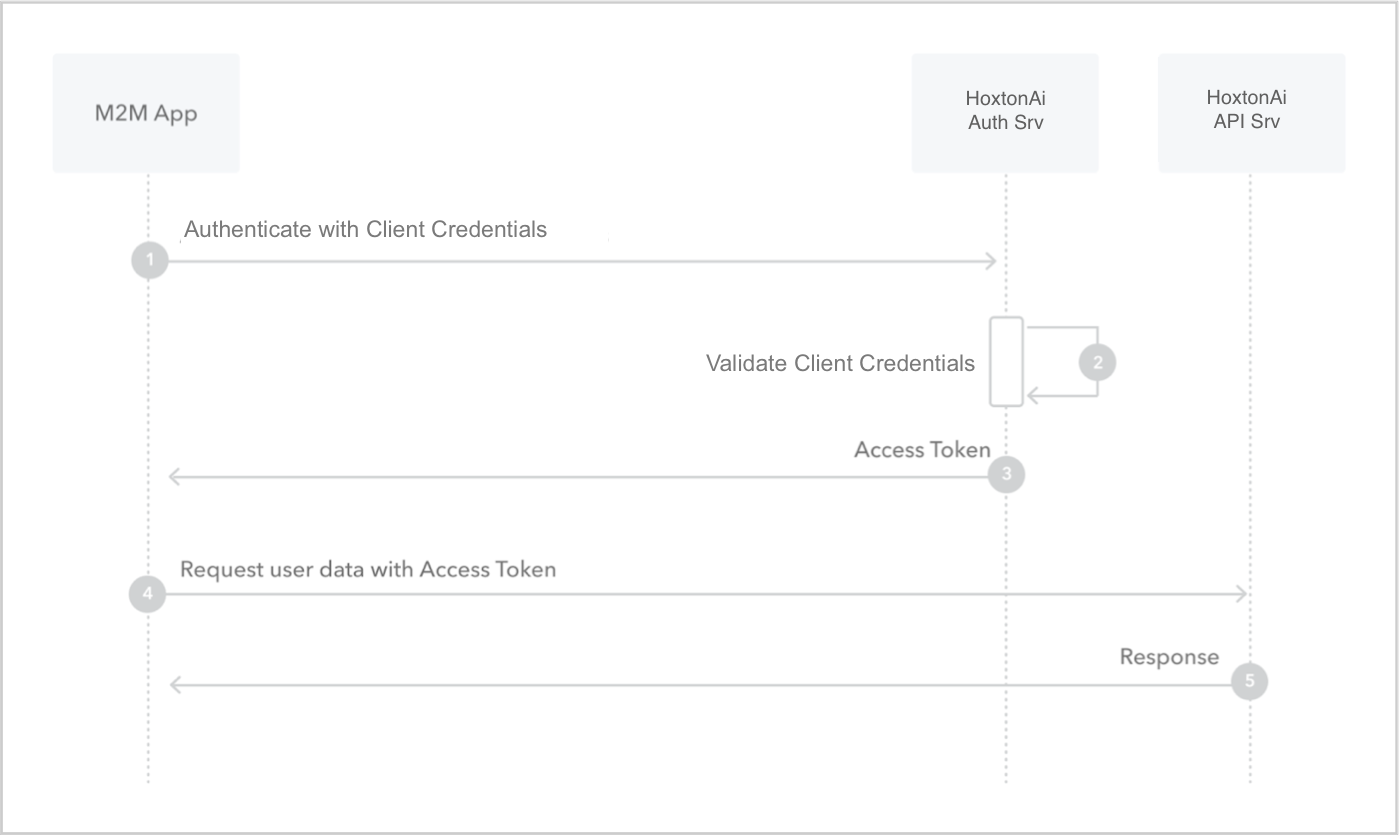
This method should be reserved for internal use only. If you are sharing with third party, use authorization code flow described above. This flow is best suited for Machine-to-Machine (M2M) applications, such as CLIs, daemons, or backend services, because the system must authenticate and authorize the application instead of a user.
To get the access token, make a POST request to the token URL with the oauth2 client's credentials (client_id & client_secret). This is a single step method.
- Get
access_token:- Endpoint:
https://auth.hoxton.ai/oauth/token - Parameters:
- Endpoint:
| Parameter | Type | Description |
|---|---|---|
grant_type | required | Always set this to client_credentials |
audience | required | Always set this to https://api.hoxton.cloud |
client_id | required | The oauth client's id |
client_secret | required | The oauth client's secret |
Once you have the required oauth client credentials, the access token can be obtained from the authorization server by making a POST request to the token URL.
curl -X POST https://auth.hoxton.ai/oauth/token
  -H 'Content-Type: application/json'
  -d '{
    "grant_type": "client_credentials",
    "audience": "https://api.hoxton.cloud",
    "client_id": "<CLIENT_ID>",
    "client_secret": "<CLIENT_SECRET>",
  }'
If the authorization server was able to successfully validate the request, you will receive HTTP 200 response with a payload containing access_token which is valid for 24hr.
{
  "access_token": "eyJhbGc...2oSuHNwA",
  "token_type": "Bearer",
  "expires_in": 86400
}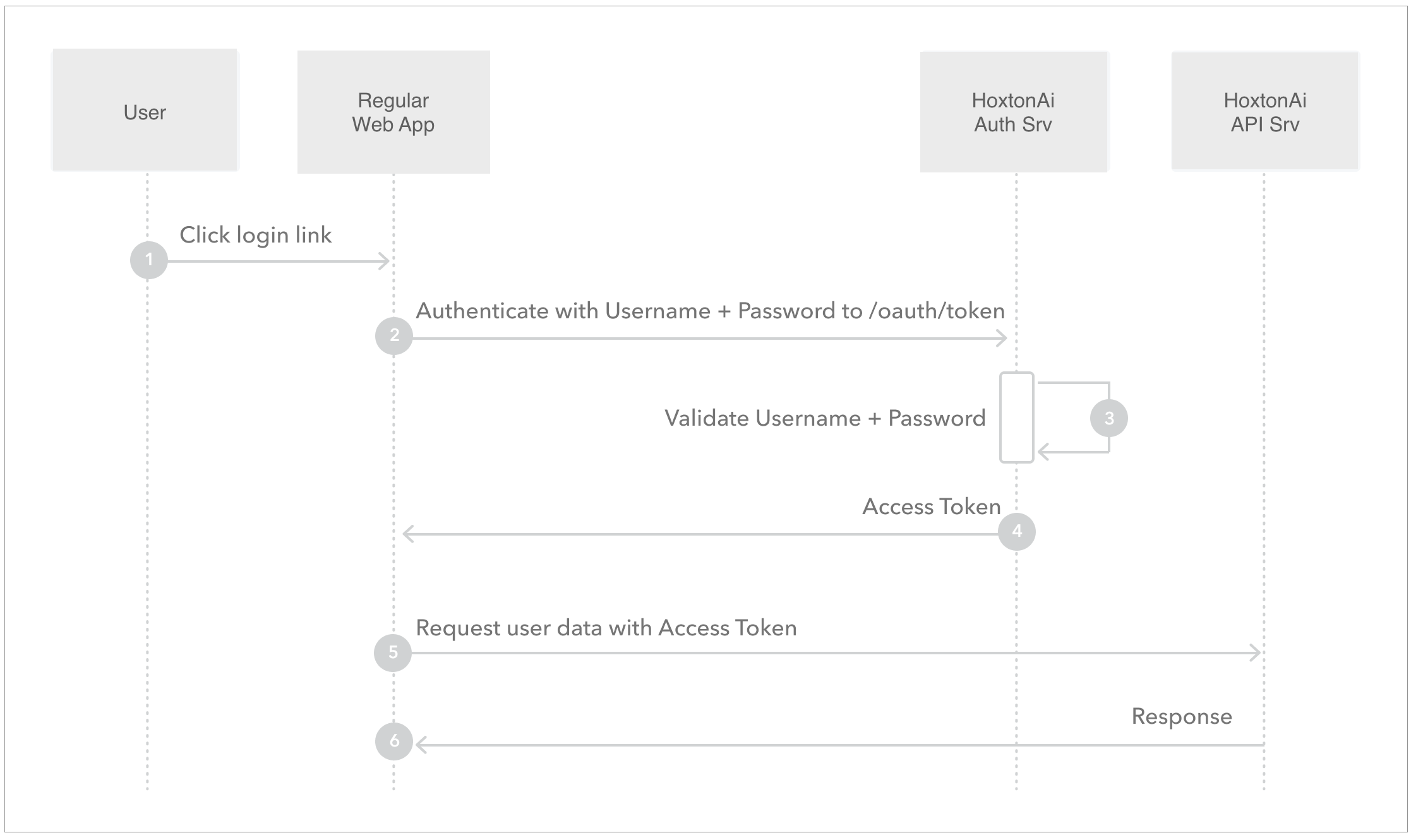
This method should be reserved for internal use only. If you are sharing with third party, use authorization code flow described above.
To get the access token first get the user's credentials (username & password). Then get the oauth2 client's credentials (client_id & client_secret). Finally, exchange them for token by making a POST request to the token URL. This is a single step method.
- Get
access_token:
- Endpoint:
https://auth.hoxton.ai/oauth/token - Parameters
- Get
| Parameter | Type | Description |
|---|---|---|
grant_type | required | Always set this to password |
audience | required | Always set this to https://api.hoxton.cloud |
scope | optional | A space separated list of claims to include in the token. Use profile to get ID token. Include offline_access to get Refresh Token. |
username | required | The user's loging username |
password | required | The user's login password |
client_id | required | The oauth client's id |
client_secret | required | The oauth client's secret |
Once you have the required oauth client credentials, the access token can be obtained from the authorization server by making a POST request to the token URL.
curl -X POST https://auth.hoxton.ai/oauth/token
  -H 'Content-Type: application/json'
  -d '{
    "grant_type": "password",
    "username": "<USERNAME>",
    "password": "<PASSWORD>",
    "audience": "https://api.hoxton.cloud",
    "scope": "offline",
    "client_id": "<CLIENT_ID>",
    "client_secret": "<CLIENT_SECRET>",
  }'
If the authorization server was able to successfully validate the request, you will receive HTTP 200 response with a payload containing access_token which is valid for 24hr.
{
  "access_token": "eyJhbGc...2oSuHNwA",
  "refresh_token": "v1.MT...4XFunfTks",
  "id_token": "eyv1.KDNM3w...vPkdKvMU",
  "token_type": "Bearer",
  "expires_in": 86400
}If you have requested offline_access claim in the authorisation call as described above, you can request a new access_token using this method.
- Get new
access_tokenandrefresh_token:
- Endpoint:
https://auth.hoxton.ai/oauth/token - Parameters
- Get new
| Parameter | Type | Description |
|---|---|---|
grant_type | required | Always set this to refresh_token |
scope | optional | A space separated list of claims to include in the token. Do not set this parameter if you want to keep the original claims |
client_id | required | The oauth client's id use in the initial authorization call |
refresh_token | required | The refresh_token from the previous successful authorization call |
To get a new access_token & refresh_token, make a POST request to the token URL.
curl -X POST https://auth.hoxton.ai/oauth/token
  -H 'Content-Type: application/json'
  -d '{
    "grant_type": "refresh_token",
    "client_id": "<CLIENT_ID>",
    "scope": "offline",
    "refresh_token": "v1.MT...4XFunfTks"
  }'
If the authorization server was able to successfully validate the request, you will receive HTTP 200 response with a payload containing access_token (which is valid for 24hr) and a refresh_token.
{
  "access_token": "eyJhbGc...2oSuHNwA",
  "refresh_token": "v1.MT...4XFunfTks",
  "id_token": "eyv1.KDNM3w...vPkdKvMU",
  "token_type": "Bearer",
  "expires_in": 86400
}
Download OpenAPI description
Overview
License
Languages
Servers
Mock server
https://coreapi.hoxton.ai/_mock/v0/
https://hoxton.cloud/api/v0/